See which unpaid bills are getting old
The Unpaid bills aging report groups everything you owe by how late it is, vendor by vendor.
The Unpaid bills aging tab on Reports lists every unpaid bill, grouped by how many days past its due date it is. Use it to see at a glance how much you owe, how much of it is late, and which vendors have waited longest.
Open the report#
In the menu, under Money, click Reports.
Click the Unpaid bills aging tab.
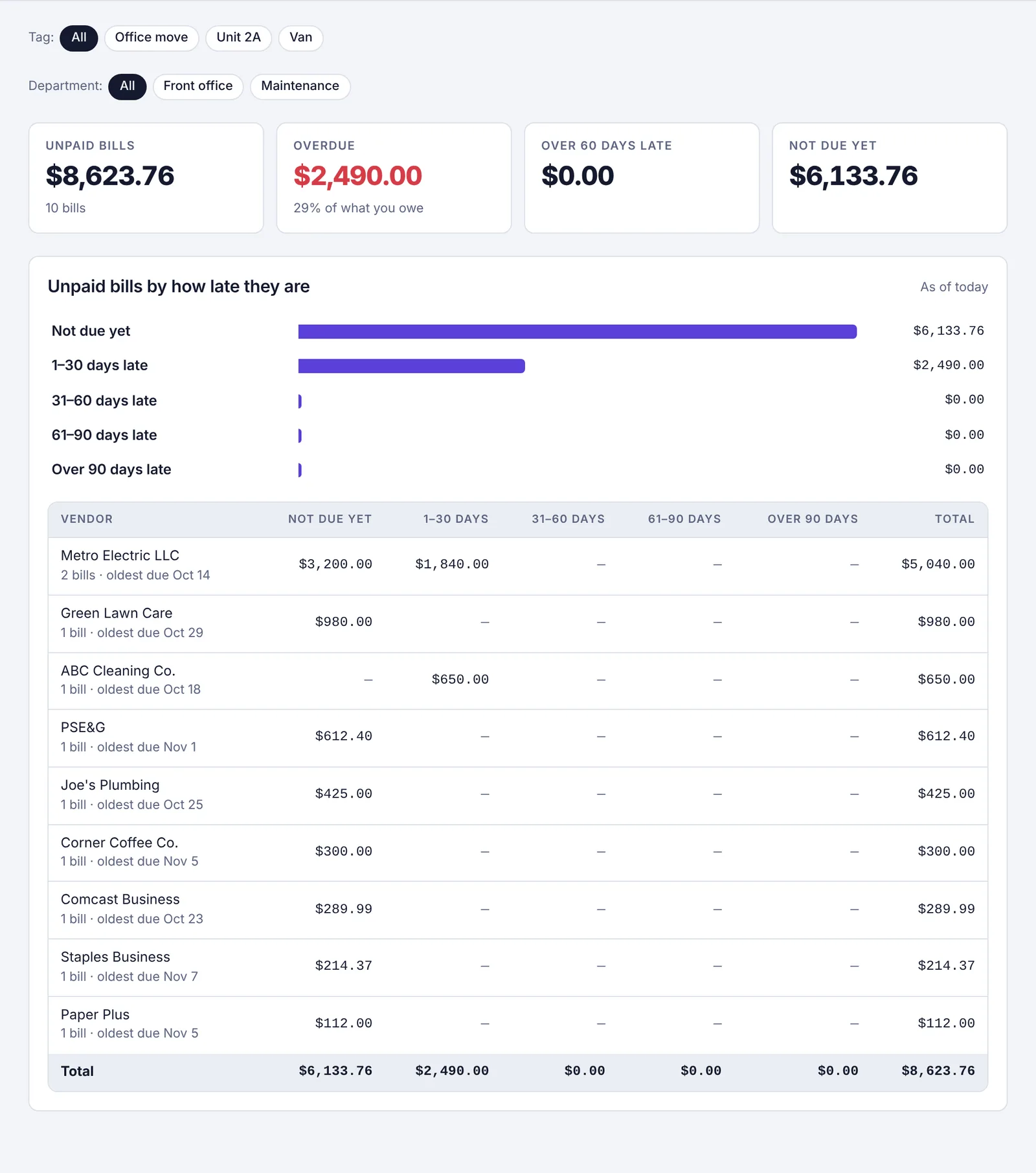
The Unpaid bills aging tab: four boxes at the top, a bar for each group, and a table with one row per vendor
The report is always worked out as of today, so it has no date buttons. You can still pick a Tag or Department to narrow it down.
What the boxes at the top mean#
Unpaid bills: the total you owe right now, and how many bills that is.
Overdue: the part that's past its due date, and what share of everything you owe that is.
Over 60 days late: bills more than 60 days past due. These are the ones to call about first.
Not due yet: bills whose due date hasn't come.
The buckets#
Below the boxes, a bar chart and a table split what you owe into five groups:
| Column | Means |
|---|---|
| Not due yet | The due date is today or later. Bills with no due date also go here. |
| 1–30 days (the chart says 1–30 days late) | 1 to 30 days past due |
| 31–60 days | 31 to 60 days past due |
| 61–90 days | 61 to 90 days past due |
| Over 90 days | more than 90 days past due |
Each row is one vendor. Under the vendor's name you'll see how many unpaid bills they have and when the oldest one was due. Vendors you owe the most are at the top. The last row adds up each column.
Part-paid bills#
If you've paid part of a bill, only the amount still owed counts here. So a $1,000 bill with $400 paid shows as $600.
What to do with it#
Pay the oldest bills: open Pay run, click All unpaid, and tick the bills you want to pay. See Pay several bills at once with a pay run.
Plan ahead: the cash forecast shows whether there's enough in the bank for the bills coming due.
Share it: click Download CSV to save the table as a spreadsheet. See Download a report as a spreadsheet.
Common questions#
A bill I already paid is still here. It's still marked unpaid in Plainstamp. Open it on Bills to pay and record the payment, and it leaves this report.
It says "No unpaid bills. Nice." You don't owe anything right now (with the tag or department you picked, if any).