Refer another office and get a free month
Share your referral link from Settings. When another office starts a paid plan, they get their first month free and you get a month free.
If you know another office that could use Plainstamp, send them your referral link. When they sign up and start a paid plan, their first month is free, and you get one month of your plan free as a credit on your next invoice. There's no limit to how many offices you can refer.
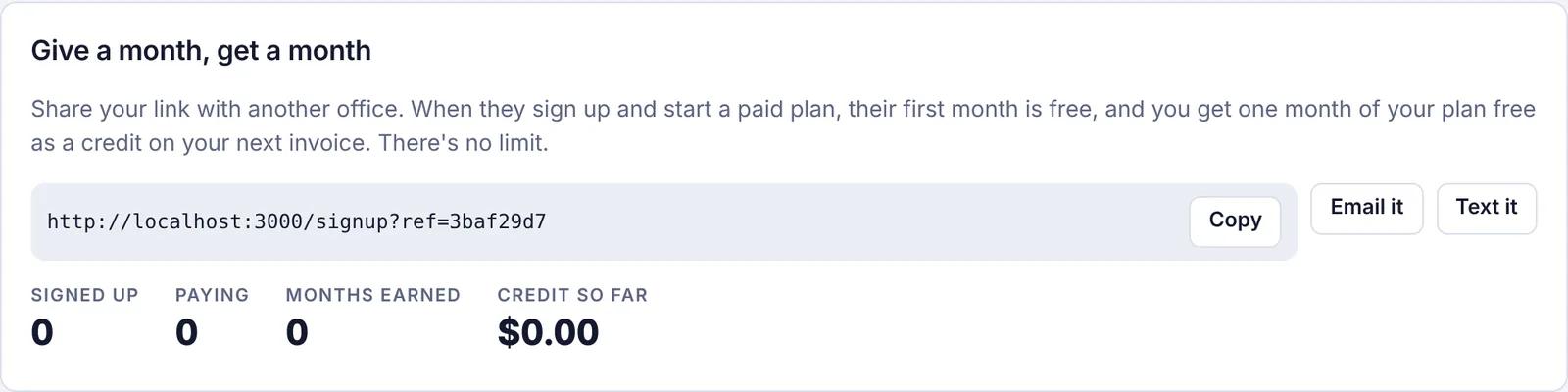
Share your link#
Go to Settings and click the Refer a friend tab.
Under Give a month, get a month, click Copy to copy your link, or use Email it or Text it to start a message with the link in it.
Send it to the other office.
They need to sign up using your link for the referral to count.
Track your referrals#
The totals under your link show:
Signed up: offices that created a workspace with your link.
Paying: those that started a paid plan.
Months earned: free months already credited to you.
Credit so far: the total credit you've received.
Below that, Your referrals lists each office (by number, not by name) with when it joined and its status:
| Status | What it means |
|---|---|
| Signed up, not paying yet | They joined but haven't started a paid plan. |
| Paying · your credit is waiting for your own paid plan | They're paying. Your free month is waiting until you are on a paid plan yourself. |
| Credited | Your free month has been applied, with the date. |