Roles: who can do what
What the Owner, Admin, Employee, Worker, Accountant and View only roles can see and do, side by side.
Everyone in a workspace has one role. The role decides which pages they see and what they can change. You pick a role when you invite someone, and an admin can change it at any time.
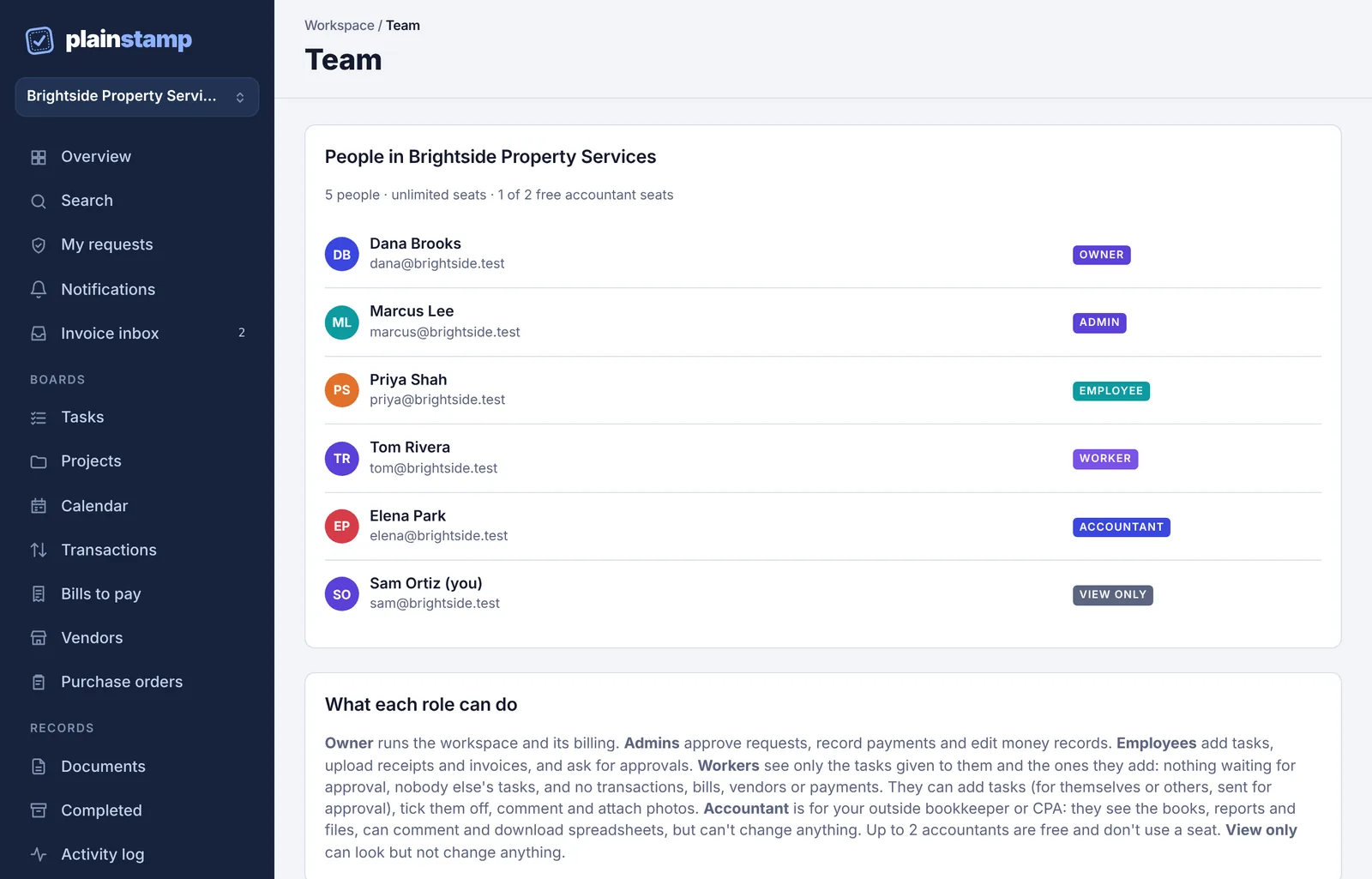
The six roles in one line each#
Owner runs the workspace and its billing. Can do everything an admin can. There is exactly one owner.
Admin approves requests, records payments, edits money records and manages the team and settings.
Employee adds tasks, uploads receipts and invoices, and asks for approvals. What they add goes to an admin first (unless it fits under their spending limit).
Worker (shown as "assigned work only" in some places) sees only the tasks given to them and the ones they add. No money, no vendors, nobody else's work. See Workers: assigned work only.
Accountant is for your outside bookkeeper or CPA. Sees the books, reports and files, can comment and download reports, but can't change anything. Accountants are free and don't use a seat (1 on Starter, 2 on paid plans).
View only can look at the boards but not change anything, and can't comment.
Side-by-side comparison#
| What | Owner | Admin | Employee | Worker | Accountant | View only |
|---|---|---|---|---|---|---|
| See the Tasks board | All tasks | All tasks | All tasks | Only their own | All tasks | All tasks |
| Add a task | Yes | Yes | Sent for approval | Sent for approval | No | No |
| Edit a task | Yes | Yes | Yes | No (can start and tick off their own) | No | No |
| Mark a task done | Yes | Yes | Yes | Only tasks given to them | No | No |
| Comment and attach files | Yes | Yes | Yes | On their own tasks | Yes (comment) | No |
| See transactions, bills and vendors | Yes | Yes | Yes | No | Yes | Yes |
| Add a transaction, bill or vendor | Yes | Yes | Sent for approval (or added if under their spending limit) | No | No | No |
| Edit or pay money records | Yes | Yes | Change request sent for approval | No | No | No |
| Approve or reject requests | Yes | Yes | No | No | No | No |
| Reports, budgets, cash forecast, bank feed | Yes | Yes | No | No | Yes (read only) | No |
| Pay run | Yes | Yes | No | No | No | No |
| Export transactions and bills to a spreadsheet (Team plan and up) | Yes | Yes | No | No | Yes | No |
| Reimbursements page | Everyone's | Everyone's | Their own | No | Everyone's | No |
| Activity log | Everything | Everything | Everything | Only about their own tasks | Everything | Everything |
| Team page | Manage | Manage | See the list | No | See the list | See the list |
| Invite, change roles, turn off, remove people | Yes | Yes | No | No | No | No |
| Workspace settings (name, money, custom fields, departments, reminders, checks, approval rules) | Yes | Yes | No | No | No | No |
| Their own name, notifications and sign-in | Yes | Yes | Yes | Yes | Yes | Yes |
| Connections (QuickBooks, Xero, bank) | Yes | Yes | No | No | No | No |
| Change the plan | Yes | No | No | No | No | No |
| Download everything as one zip | Yes | No | No | No | No | No |
| Hand the workspace to someone else | Yes | No | No | No | No | No |
| Uses a seat | Yes | Yes | Yes | Yes | No (1 free on Starter, 2 on paid plans) | Yes |
Which role should I pick?#
Your office manager or a partner who signs off on spending: Admin.
Staff who buy things, upload receipts or hand in invoices: Employee. If you're on the Small plan or up, give them a spending limit so small purchases don't need approval. See Spending limits.
Field staff, cleaners, drivers or maintenance crew who just need their jobs: Worker.
Your outside bookkeeper or CPA: Accountant. It's free and they can't change your books by mistake.
Someone who needs to look but never touch, like an investor or a board member: View only.
What people see in the menu#
The menu on the left only shows what someone's role allows.
Workers get a short menu: My work, Search, My tasks, Calendar, My requests, Notifications, Completed, Activity log and Settings.
The Money section (Reports, Budgets, Cash forecast, Bank feed) shows for owners, admins and accountants. Pay run shows for owners and admins only.
Connections and Plan & billing show for owners and admins.
Employees, accountants and view-only people see My requests where admins see My approvals.
If someone opens a page that isn't part of their role, they see a short note saying so instead of the page.
Private projects#
On plans with Projects, a project can be private. Tasks in a private project are only seen by the people on that project, admins, and whoever the task is for or from, whatever their role.