Trash: restore or delete for good
Deleted tasks, transactions, bills, vendors, purchase orders, projects and documents wait in the Trash for 7 days. Bring them back, or delete them for good.
Deleting something in Plainstamp doesn't remove it straight away. It goes to the Trash, where it waits for 7 days. Until then you can restore it, exactly as it was, with its comments, checklist and files. After 7 days it's deleted for good.
What goes to the trash#
Tasks, transactions, bills, vendors, purchase orders, projects and documents. Anything you delete from a board or an open item lands here. So do items cleared out by automatic clean-up; those show Clean-up as who deleted them.
Open the Trash#
Click Trash in the sidebar, under Records.
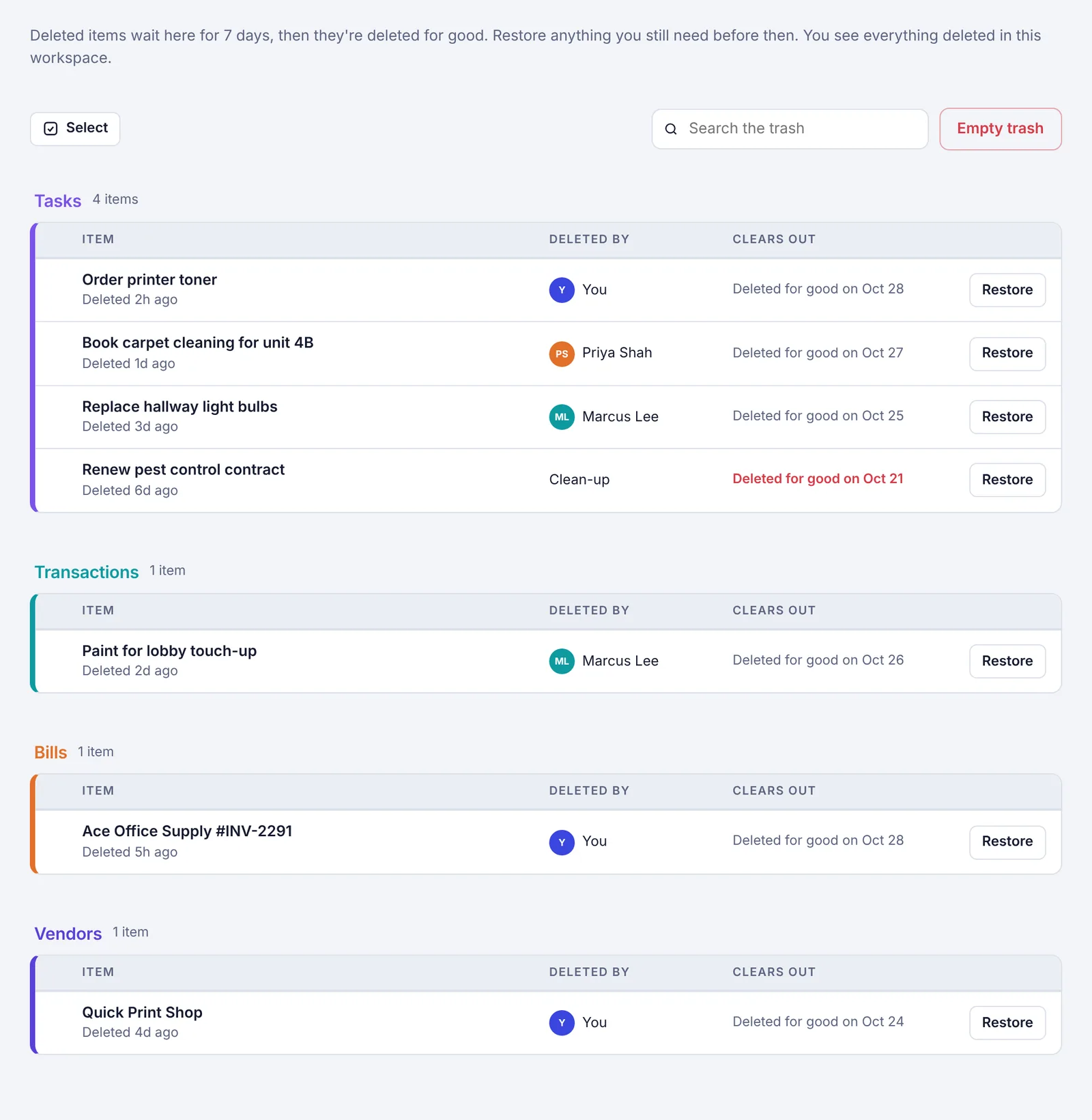
Items are grouped by kind (Tasks, Transactions, Bills, Vendors, Purchase orders, Projects, Documents). Each one shows:
its name and how long ago it was deleted
who deleted it (or Clean-up if automatic clean-up moved it there)
Deleted for good on and the date it will be removed (the Clears out column). The date turns red when it's less than a day away.
Type in Search the trash to find something by name.
Restore something#
Find the item in the Trash.
Click Restore on its row.
It goes back to where it was: a task to Tasks (or Completed if it was finished), a transaction or bill to its board, and so on. A message confirms it, with a link to the board it went back to.
Restore or delete several at once#
Point at an item and tick the box that appears at its left. On a phone or tablet, tap Select first to show the boxes.
Tick more items. The box in a group's header ticks the whole group; hold Shift while ticking to pick everything in between.
A bar at the bottom shows how many you picked. Click Select all in the bar to pick everything shown.
Click Restore, or Delete forever. Delete forever asks you to confirm, because it can't be undone.
Click Clear (or press Esc) to untick everything.
Empty the trash#
Click Empty trash.
Confirm: Delete everything in the trash for good? This can't be undone.
Owners and admins empty the whole workspace's trash. Everyone else empties only the items they deleted themselves.
Questions#
Where did my deleted item go? Look in the Trash. If it's not there, it was deleted more than 7 days ago, or someone else deleted it (only owners and admins see what other people deleted).
Do items in the trash count anywhere? No. They're hidden from boards, reports, search, the calendar and spreadsheet downloads until you restore them.
Can I keep things in the trash longer? No, the trash always clears after 7 days. If you might need something later, keep it in Completed instead of deleting it.