The invite link doesn't work
What each invite error means, what to do when the invite email doesn't arrive, and how admins can send it again.
Invites are created by an owner or admin on the Team page. When they type your email address, Plainstamp emails you the invite; an invite made without an email is a link they send you themselves. Each link lasts 14 days and works once.
"I never got an invite email"#
The invite email comes from Plainstamp with the subject "Name invited you to workspace on Plainstamp" and an Accept the invite button.
Search your inbox for "Plainstamp" and check your spam or junk folder.
Make sure the admin invited the address you're checking. If they used a different one, ask for a new invite.
If they made the invite without an email ("Anyone with the link"), no email is sent. They need to copy the link and send it to you.
Still nothing? Ask the admin to click Email it again next to your invite under Team › Waiting to join, or to copy the link and send it to you by text or chat.
What the messages mean#
| You see | What it means | What to do |
|---|---|---|
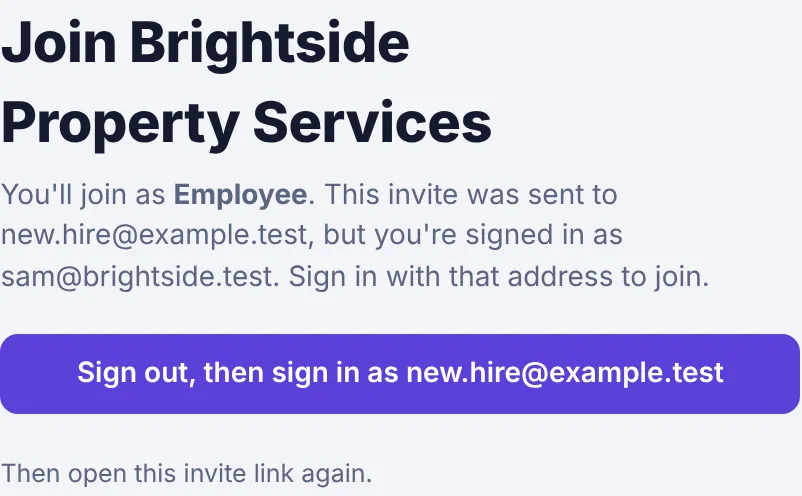
| "This invite was sent to … but you're signed in as …" | The invite is for one email address and you're signed in with another. | Click Sign out, then sign in as …, sign in (or sign up) with the invited address, then open the invite link again. Or ask the admin for a new invite for the address you use. |
| "This invite has expired. Ask for a new one." | It's more than 14 days old. | Ask an admin for a new link. |
| "This invite has already been used." | Someone (maybe you) already joined with it. | If it was you, just sign in. Otherwise ask for a new link. |
| "This invite link isn't valid." | The link is incomplete, or the invite was cancelled. | Copy the whole link again, or ask for a new one. |
| "This workspace has reached the number of people on its plan." | Every seat is taken. | Ask an admin to upgrade or free up a seat. |
| "Your account in this workspace has been turned off." | An admin turned your access off. | Ask an admin to turn it back on. |
If the invite was for a different address, the join page tells you, and offers a button to switch accounts instead of Join workspace:
For admins: send the invite again#
Go to Team.
Under Waiting to join, find the person. Click Email it again to resend the invite email, or Copy to send the same link yourself, as long as it hasn't expired.
If it has expired or went to the wrong address, click Cancel invite, then create a new one under Invite someone.
Unused invites count toward your plan's seats until they expire or you cancel them, so cancel ones you don't need. Accountant invites don't use a seat, but only 1 accountant on Starter and 2 on paid plans (including invites) are allowed. See Invite your team.