Refer another office and get a free month
Share your link with another office. They get their first month free, and you get a month of your plan free once they pay.
If you like Plainstamp, share it with another office. When they sign up with your link and start a paid plan, their first month is free. Once they've paid, you get one month of your own plan free as a credit on your next invoice.
Share your link#
In the menu on the left, click Settings.
Click the Refer a friend tab.
Under Give a month, get a month, share your link:
Copy copies it so you can paste it anywhere.
Email it opens a new email with the link in it.
Text it opens a text message with the link in it (on a phone).
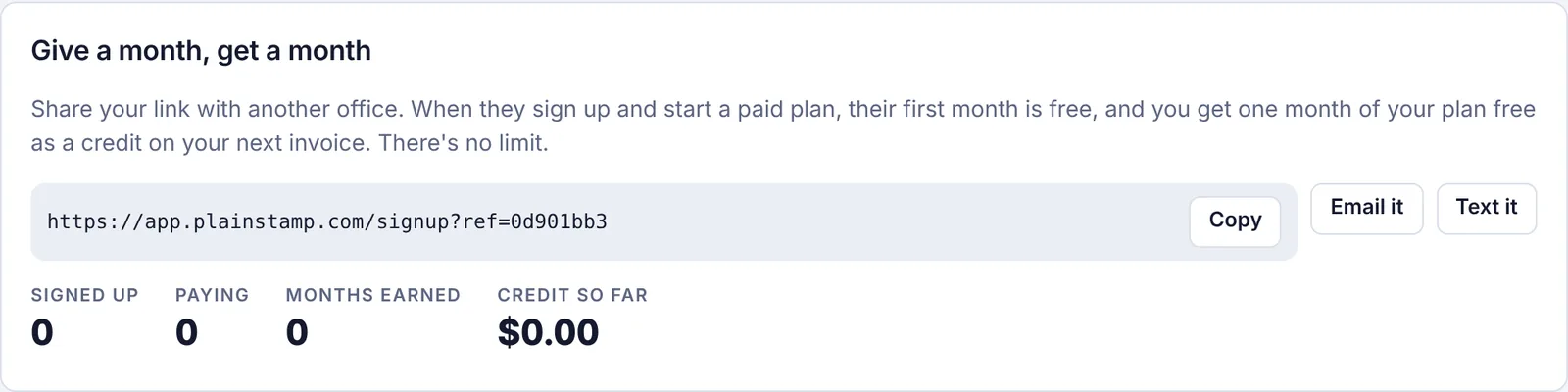
The Refer a friend tab with your link and totals
How the credit works#
The other office opens your link and signs up. They show under Signed up.
They choose a paid plan. Their first month is free; the discount is added automatically when they pay.
Once they've paid for a month, they show under Paying.
You get a credit worth one month of your plan on your next invoice. It shows under Months earned and Credit so far.
Below the totals, Your referrals lists each office (without names, for their privacy) and where it's at:
| Status | What it means |
|---|---|
| Signed up, not paying yet | They signed up but haven't started a paid plan. |
| Paying · your credit is waiting for your own paid plan | They're paying, but you don't own a workspace with a paid plan yet. The credit is added once you do. |
| Credited | The free month has been added to your invoice. |
Good to know#
The credit goes to a paid workspace that you own. If you're not an owner, or your workspace is on the free Starter plan, it waits until you are.
You can earn up to 12 free months in a year.
The office you refer has to be new to paying for Plainstamp; the first-month discount only applies to their first paid plan.