Plans: what each one includes
The four Plainstamp plans side by side, what each one adds, and how people, invoice reads, file space and emails are counted.
Plainstamp has four plans: Starter (free), Small, Team and Business. Every plan has the same boards, approvals and comments. Bigger plans add more people, more invoice reads, more file space, more emails and extra tools.
You can see the plans, and which one your workspace is on, on the Plan & billing page.
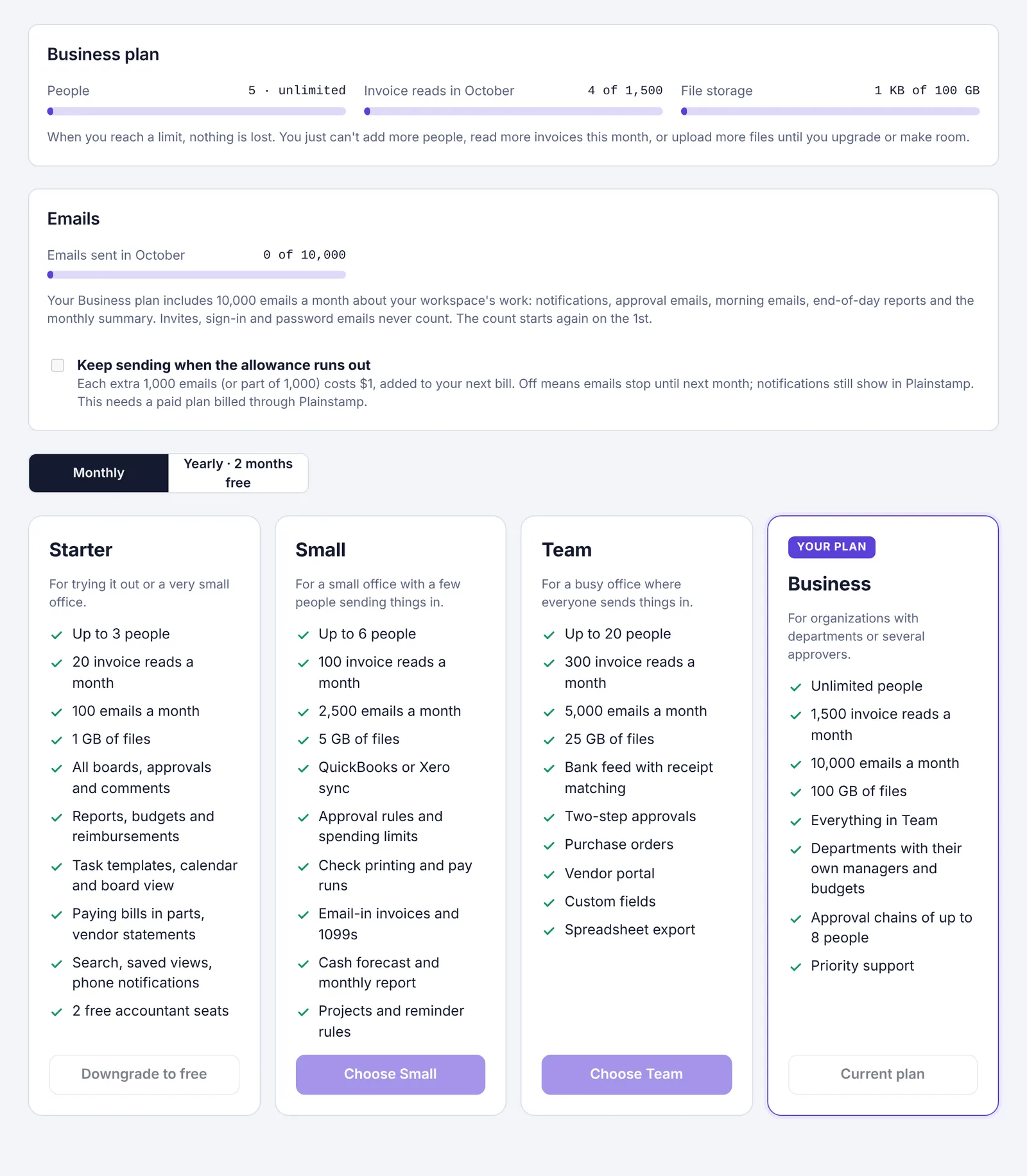
Limits on each plan#
| Starter | Small | Team | Business | |
|---|---|---|---|---|
| People | Up to 3 | Up to 6 | Up to 20 | Unlimited |
| Invoice reads a month | 20 | 100 | 300 | 1,500 |
| File space | 1 GB | 5 GB | 25 GB | 100 GB |
| Emails a month | 100 | 2,500 | 5,000 | 10,000 |
| Free accountant seats | 1 | 2 | 2 | 2 |
People counts everyone in the workspace who has an account that's turned on, plus invites that haven't been used yet. Accountants don't count: Starter includes 1 free accountant seat and paid plans include 2.
Invoice reads are the times Plainstamp reads a bill or receipt for you and fills in the vendor, amount and dates. The count starts again at the start of each month. When you run out, you can still attach the file and type the details in yourself.
File space is everything attached to tasks, bills, transactions and vendors.
Emails are the emails Plainstamp sends about your workspace's work: notifications, approval emails, new-task emails, morning emails, end-of-day reports and the monthly summary. Invites and sign-in emails never count. The count starts again on the 1st. On paid plans, the owner can choose to keep sending after the allowance runs out, for a small extra charge. See How many emails your plan includes.
What each plan adds#
Starter (free) includes:
All boards, approvals and comments
Reports, budgets and reimbursements
Task templates, the calendar and the board view
Paying bills in parts, and vendor statements
Search, saved views and phone notifications
The morning email, new-task emails, end-of-day reports and audit PDFs
Small adds:
QuickBooks or Xero sync
Approval rules by amount, and spending limits
Check printing and pay runs
Email-in invoices and 1099 tracking
The cash forecast and the monthly summary email
Projects and reminder rules
Calendar sync: your tasks in Google, Apple, Outlook or Samsung Calendar
Other currencies
Team adds everything in Small, plus:
The bank feed with receipt matching
Two-step approvals
Purchase orders
The vendor portal
Custom fields
Spreadsheet export of transactions and bills
Business adds everything in Team, plus:
Unlimited people
Departments with their own managers and budgets
Approval chains of 3 to 8 approvers
Priority support
Which plan should I pick?#
Trying it out, or just 2 or 3 people? Start on Starter. It's free for as long as you like.
A few people sending in bills and receipts, and you want rules and limits? Small.
Most of the office sends things in, and you want the bank feed or purchase orders? Team.
More than 20 people, or departments with their own approvers? Business.
You can move up or down at any time. See Choose or change your plan.
Monthly or yearly#
Every paid plan can be paid monthly or yearly. Paying yearly works out to about 2 months free compared with paying month by month. See Choose or change your plan.
A free plan from Plainstamp#
Sometimes Plainstamp gives a workspace a paid plan for free for a while (for example, as part of a special offer). It shows as your plan on the Plan & billing page, marked Your plan, and its button says Current plan whether Monthly or Yearly is picked, because there's no billing period to switch. When it ends, the workspace goes back to Starter, unless you've chosen a paid plan yourself. Nothing is deleted when that happens.